
 Christina Sørensen
e14d54e741
Revert "feat(ci): add apt installation workflow"
Christina Sørensen
e14d54e741
Revert "feat(ci): add apt installation workflow"
|
пре 2 година | |
|---|---|---|
| .github | пре 2 година | |
| completions | пре 2 година | |
| devtools | пре 2 година | |
| man | пре 2 година | |
| snap | пре 2 година | |
| src | пре 2 година | |
| tests | пре 2 година | |
| .envrc | пре 2 година | |
| .gitignore | пре 2 година | |
| .rustfmt.toml | пре 5 година | |
| CHANGELOG.md | пре 2 година | |
| CODE_OF_CONDUCT.md | пре 2 година | |
| CONTRIBUTING.md | пре 2 година | |
| Cargo.lock | пре 2 година | |
| Cargo.toml | пре 2 година | |
| Justfile | пре 2 година | |
| LICENCE | пре 11 година | |
| README.md | пре 2 година | |
| SECURITY.md | пре 2 година | |
| build.rs | пре 2 година | |
| cliff.toml | пре 2 година | |
| deb.asc | пре 2 година | |
| deny.toml | пре 2 година | |
| flake.lock | пре 2 година | |
| flake.nix | пре 2 година | |
| rust-toolchain.toml | пре 2 година | |
| screenshots.png | пре 2 година | |
| treefmt.nix | пре 2 година |
README.md
 [](https://github.com/eza-community/eza/actions/workflows/unit-tests.yml)


[](https://github.com/eza-community/eza/actions/workflows/unit-tests.yml)


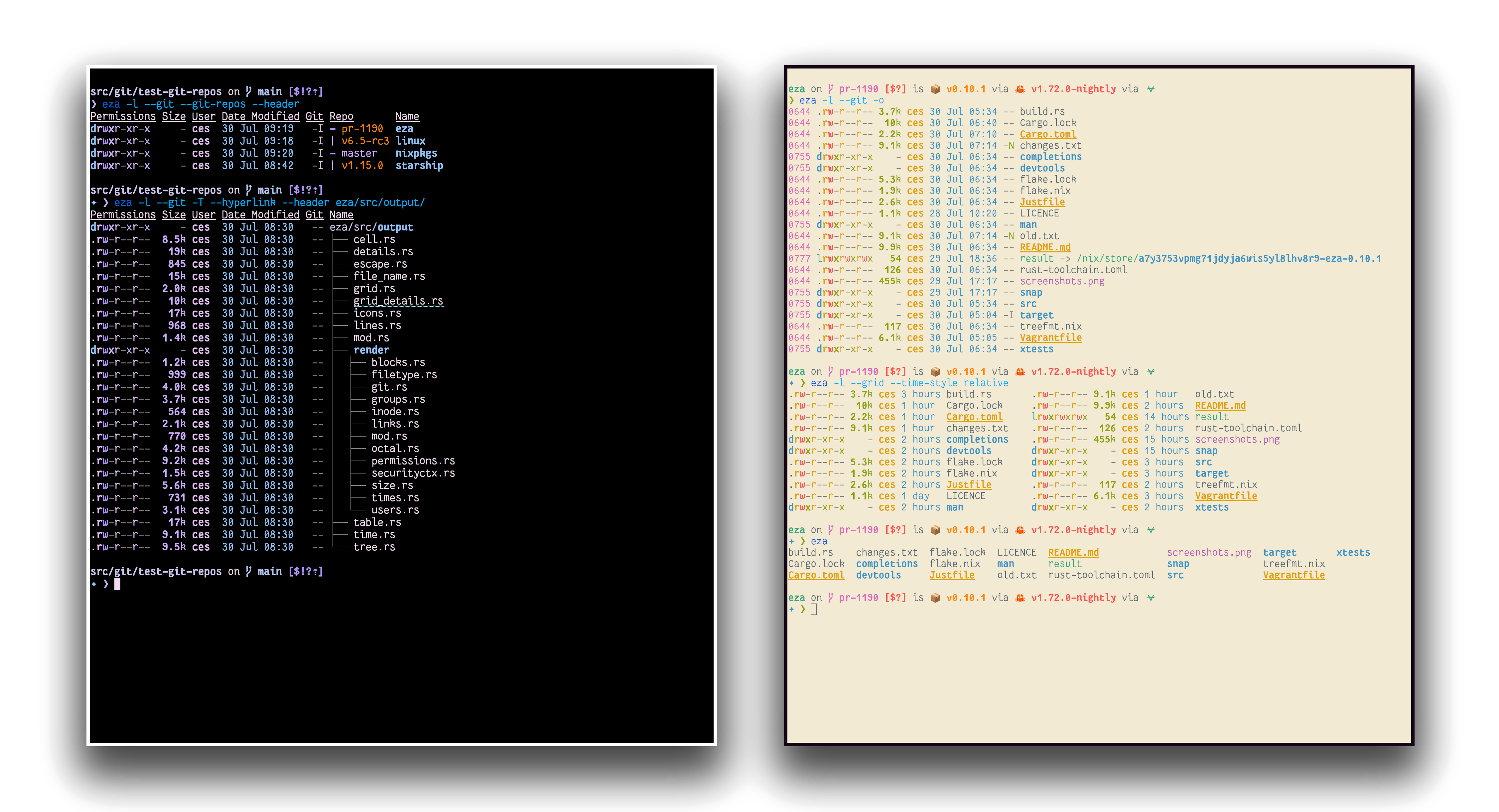
eza is a modern, maintained replacement for the venerable file-listing command-line program ls that ships with Unix and Linux operating systems, giving it more features and better defaults.
It uses colours to distinguish file types and metadata.
It knows about symlinks, extended attributes, and Git.
And it’s small, fast, and just one single binary.
By deliberately making some decisions differently, eza attempts to be a more featureful, more user-friendly version of ls.
eza features not in exa (non-exhaustive):
- Fixes “The Grid Bug” introduced in exa 2021.
- Hyperlink support.
- Mount point details.
- Selinux context output.
- Git repo status output.
- Human readable relative dates.
- Several security fixes.
- Many smaller bug fixes/changes!
- Support for
brightterminal colours. ---
Nix ❄️
If you already have Nix setup with flake support, you can try out eza with the nix run command:
nix run github:eza-community/eza
Nix will build eza and run it.
If you want to pass arguments this way, use e.g. nix run github:eza-community/eza -- -ol.
eza is available for Windows, macOS and Linux.
Cargo (crates.io)


If you already have a Rust environment set up, you can use the cargo install command:
cargo install eza
Cargo will build the eza binary and place it in $HOME/.local/share/cargo/bin/eza.
Cargo (git)
If you already have a Rust environment set up, you can use the cargo install command in your local clone of the repo:
git clone https://github.com/eza-community/eza.git
cd eza
cargo install --path .
Cargo will build the eza binary and place it in $HOME/.cargo.
Arch Linux

Eza is available in the [extra] repository of Arch Linux.
pacman -S eza
Debian and Ubuntu
Eza is available from deb.gierens.de. The GPG public key is in this repo under deb.asc.
To install eza from this repo use:
wget -qO- https://raw.githubusercontent.com/eza-community/eza/main/deb.asc | sudo tee /etc/apt/trusted.gpg.d/gierens.asc
echo "deb http://deb.gierens.de stable main" | sudo tee /etc/apt/sources.list.d/gierens.list
sudo apt update
sudo apt install -y eza
Note: on some systems like Docker containers apt might require the key to be in dearmored format, then use this command instead:
wget -qO- https://raw.githubusercontent.com/eza-community/eza/main/deb.asc | gpg --dearmor | sudo tee /etc/apt/trusted.gpg.d/gierens.asc
before proceeding with the others from above.
Nix (Linux, MacOS)

Eza is available from Nixpkgs.
For nix profile users:
nix profile install nixpkgs#eza
For nix-env users:
nix-env -i eza
Gentoo

On Gentoo, eza is available as a package sys-apps/eza:
emerge --ask sys-apps/eza
openSUSE
Eza is available at openSUSE:Factory/eza:
zypper ar https://download.opensuse.org/tumbleweed/repo/oss/ factory-oss
zypper in eza
The preceding repository also contains the Bash, Fish, and Zsh completions.
Fedora
You can install Eza from openSUSE:Factory/eza:
tee /etc/yum.repos.d/opensuse-tumbleweed-oss.repo <<EOL
[opensuse-tumbleweed-oss]
name=OpenSUSE Tumbleweed OSS
baseurl=https://download.opensuse.org/tumbleweed/repo/oss/
enabled=1
gpgcheck=1
gpgkey=https://download.opensuse.org/tumbleweed/repo/oss/repodata/repomd.xml.key
EOL

dnf install eza
The preceding repository also contains the Bash, Fish, and Zsh completions.
Brew (MacOS)

Eza is available from Homebrew.
To install eza, run:
brew install eza
MacPorts (macOS)

On macOS, eza is also available via MacPorts.
To install eza, run:
sudo port install eza
Click sections to expand.
<summary> Command-line options </summary>
Command-line options
eza’s options are almost, but not quite, entirely unlike ls’s.
Display options
- -1, --oneline: display one entry per line
- -G, --grid: display entries as a grid (default)
- -l, --long: display extended details and attributes
- -R, --recurse: recurse into directories
- -T, --tree: recurse into directories as a tree
- -x, --across: sort the grid across, rather than downwards
- -F, --classify: display type indicator by file names
- --colo[u]r: when to use terminal colours
- --colo[u]r-scale: highlight levels of file sizes distinctly
- --icons: display icons
- --no-icons: don't display icons (always overrides --icons)
- --hyperlink: display entries as hyperlinks
- -w, --width=(columns): set screen width in columns
Filtering options
- -a, --all: show hidden and 'dot' files
- -d, --list-dirs: list directories like regular files
- -L, --level=(depth): limit the depth of recursion
- -r, --reverse: reverse the sort order
- -s, --sort=(field): which field to sort by
- --group-directories-first: list directories before other files
- -D, --only-dirs: list only directories
- --git-ignore: ignore files mentioned in
.gitignore - -I, --ignore-glob=(globs): glob patterns (pipe-separated) of files to ignore
Pass the --all option twice to also show the . and .. directories.
Long view options
These options are available when running with --long (-l):
- -b, --binary: list file sizes with binary prefixes
- -B, --bytes: list file sizes in bytes, without any prefixes
- -g, --group: list each file’s group
- -h, --header: add a header row to each column
- -H, --links: list each file’s number of hard links
- -i, --inode: list each file’s inode number
- -m, --modified: use the modified timestamp field
- -M, --mounts: Show mount details (Linux only).
- -S, --blocksize: show size of allocated file system blocks
- -t, --time=(field): which timestamp field to use
- -u, --accessed: use the accessed timestamp field
- -U, --created: use the created timestamp field
- -X, --dereference: dereference symlinks for file information
- -Z, --context: list each file’s security context
- -@, --extended: list each file’s extended attributes and sizes
- --changed: use the changed timestamp field
- --git: list each file’s Git status, if tracked or ignored
- --no-git: suppress Git status (always overrides
--git,--git-repos,--git-repos-no-status) - --time-style: how to format timestamps
- --no-permissions: suppress the permissions field
- -o, --octal-permissions: list each file's permission in octal format
- --no-filesize: suppress the filesize field
- --no-user: suppress the user field
- --no-time: suppress the time field
Some of the options accept parameters:
- Valid --color options are always, automatic, and never.
- Valid sort fields are accessed, changed, created, extension, Extension, inode, modified, name, Name, size, type, and none. Fields starting with a capital letter sort uppercase before lowercase. The modified field has the aliases date, time, and newest, while its reverse has the aliases age and oldest.
- Valid time fields are modified, changed, accessed, and created.
- Valid time styles are default, iso, long-iso, full-iso, and relative.
<summary> Development </summary>
Development
<img src="https://img.shields.io/badge/rustc-1.63.0+-lightgray.svg" alt="Rust 1.63.0+" />
<img src="https://img.shields.io/badge/licence-MIT-green" alt="MIT Licence" />
eza is written in Rust. You will need rustc version 1.56.1 or higher. The recommended way to install Rust for development is from the official download page, using rustup.
Once Rust is installed, you can compile eza with Cargo:
cargo build
cargo test
The just command runner can be used to run some helpful development commands, in a manner similar to
make. Runjust --listto get an overview of what’s available.If you are compiling a copy for yourself, be sure to run
cargo build --releaseorjust build-releaseto benefit from release-mode optimisations. Copy the resulting binary, which will be in thetarget/releasedirectory, into a folder in your$PATH./usr/local/binis usually a good choice.To compile and install the manual pages, you will need pandoc. The
just mancommand will compile the Markdown into manual pages, which it will place in thetarget/mandirectory. To use them, copy them into a directory thatmanwill read./usr/local/share/manis usually a good choice.eza depends on libgit2 for certain features. If you’re unable to compile libgit2, you can opt out of Git support by running
cargo build --no-default-features.If you intend to compile for musl, you will need to use the flag
vendored-opensslif you want to get the Git feature working. The full command iscargo build --release --target=x86_64-unknown-linux-musl --features vendored-openssl,git.
Developing on Nix (experimental) ❄️
If you have a working Nix installation with flake support, you can use nix to manage your dev environment.
nix develop
The Nix Flake has a few features:
- Run
nix flake checkto runtreefmton the repo. - Run
nix buildand manually test./results/bin/eza -- <arguments>for easy debugging. - Run
nix build .#testto runcargo testvia the flake. - Run
nix build .#clippyto lint with clippy (still work in progress).